For many small businesses, managing office printers starts as an informal responsibility. Someone orders toner, another employee handles paper jams, IT gets called when a printer disappears from the network, and the office manager schedules service when the copier stops working.
As the business grows, that approach can become surprisingly time-consuming. Employees spend time troubleshooting equipment, supplies are ordered reactively, printers accumulate across departments, and no one has a clear picture of how the entire print environment is being managed.
Managed print services give small businesses another option. Instead of handling printer supplies, maintenance, service and equipment decisions internally, businesses can put those responsibilities under a structured print management program. For Long Island businesses, that can mean fewer interruptions, clearer responsibility, and less employee time spent dealing with printers.
What Managing Printers In-House Really Requires
The challenge with managing printers internally is that responsibility is usually spread across several people. The office manager may order toner. IT handles network connectivity. Employees troubleshoot minor problems. Managers approve repairs, leases, or replacement equipment.
No single task seems especially demanding, but together they create another technology function the business has to manage.
These costs often appear across different departments and budgets, making them difficult to track.
For example, an office manager may order toner, while the IT team manages network connectivity. An employee may spend 30 minutes troubleshooting a paper jam, and a manager may approve an emergency repair. Later, someone may purchase a new desktop printer because the existing copier cannot keep up with demand.
None of these expenses seem significant on their own. Together, however, they can create a printing environment that is more expensive and difficult to manage than the business realizes.
This is one of the primary reasons small businesses should take a closer look at managed print solutions. The goal is to move away from a collection of disconnected decisions and toward a more organized strategy for equipment, service, supplies, and workflows.
Your Employees Were Not Hired to Manage Printers
Small businesses depend on their employees to wear multiple hats. That can be an advantage, but it also can create inefficiencies when employees are constantly pulled away from their primary responsibilities.
Think about what happens when the office copier stops working. Someone tries to fix it. If that doesn’t work, another employee searches online for the problem. The office manager calls for service. Employees send print jobs to another device or delay important documents until the problem is resolved.
Meanwhile, the workday continues. The hidden cost is not just the repair, it’s the lost productivity surrounding the issue.
Your office manager should not have to become a supply specialist. Your IT professional shouldn’t spend the afternoon troubleshooting a copier when they could focus on your company’s broader IT infrastructure and support needs. And your sales team shouldn’t have to wait on a proposal because a printer is offline.
A managed print approach helps shift those responsibilities to a provider that specializes in office equipment and support. Instead of asking, “Who is going to deal with the copier?”, your employees have an established resource to turn to when service or support is needed.
Why Break-Fix Printer Management Becomes a Problem
Many small businesses manage print using a simple strategy: wait until something breaks and then deal with it. This is often called a break-fix approach.
It may seem cost-effective when equipment is working properly. The problem is that when an issue does occur, the business is suddenly dealing with several unknowns.
How quickly can a technician arrive? What will the repair cost? Is the necessary part available? Will the copier be down for hours or days?
Unexpected repairs can make budgeting difficult, particularly for smaller organizations with limited resources. A more proactive strategy can help create greater predictability.
Rather than searching for help every time a printer or copier fails, managed print services establish a support structure before problems occur. Depending on the agreement, that may include maintenance, service, supplies, usage monitoring, and equipment management.
That is a major advantage of working with a company that understands both the equipment and the day-to-day needs of the business.
Printing Supplies Should Not Become an Emergency
There is a familiar moment in many offices.
An employee sends an important document to the printer and receives a message that the toner is empty. Now someone needs to figure out which cartridge is required, check whether there is a spare in the supply closet, place an order, and potentially wait for delivery. This is a small problem, but small problems repeated throughout the year become a major source of wasted time.
A managed print strategy can help businesses take a more proactive approach to supply management. Rather than relying entirely on employees to manually monitor toner levels and remember when to place orders, businesses can establish processes designed around actual equipment usage.
The result is fewer emergency toner orders, less employee involvement, and a more predictable approach to keeping printers available when employees need them.
Do You Know What Your Printers Are Costing You?
Printer expenses rarely appear in one place. A business may have a copier payment, toner orders, repair invoices, desktop printers purchased by individual departments, and employee time devoted to troubleshooting.
Managed print services can bring those pieces together so businesses can better understand which devices are being used, where unnecessary expenses may exist, and whether the current equipment still fits the way employees work.
Adding Another Printer Is Not Always the Answer
One of the most common mistakes in an unmanaged office is simply adding more devices whenever a problem occurs.
The main copier is busy, so someone buys another printer. A department wants more convenient access, so another device is added. Eventually, the office has a collection of printers from different manufacturers, purchased at different times, using different supplies, and requiring different types of service.
More equipment does not always create more efficiency. In many cases, the better solution is to evaluate how employees are actually using the existing equipment.
Modern copiers and multifunction printers can combine printing, copying and scanning capabilities in one central system, potentially reducing the need for multiple standalone devices. Available equipment can also support features such as secure print, user authentication, encrypted documents, mobile printing, and multiple scan destinations depending on the device and configuration.
The right question is not, “Where can we put another printer?” It is, “What equipment and workflow will best support the way our business operates?”
Managed Print Is Also About Document Workflow
Today’s copiers and multifunction devices can do much more than produce copies.
They can help businesses scan, distribute, store, and secure documents as part of a larger workflow. For small businesses, that can make a meaningful difference.
Consider the traditional document process. An employee receives a paper document, scans it to a computer, renames the file, attaches it to an email, and then sends it to the appropriate person.
A properly configured multifunction printer can scan documents directly to email, shared folders, and other business systems, reducing some of the manual steps employees use to move information from paper into digital workflows. Some models also support searchable and editable document formats through available options.
These capabilities can help reduce unnecessary manual steps. That is why managed print should not be viewed only as a way to keep a copier running. It can also be part of a broader conversation about improving how information moves throughout the organization.
Printer Security Should Not Be Overlooked
Printers and copiers are connected devices.
They may process contracts, customer information, employee records, financial document, and other sensitive information. Yet many businesses still treat print security as an afterthought. A smarter approach asks questions such as:
- Who has access to the device?
- Are confidential print jobs protected?
- Are employees using authentication?
- How is information stored on the device?
- Are scanned documents being sent to the correct locations?
- Does the equipment meet the company’s security requirements?
Modern multifunction devices can offer security capabilities such as secure print, encrypted PDF functionality, user authentication, network communication protections, and data encryption features, depending on the model and configuration.
For a small business without someone specifically responsible for print technology, a managed print provider can help evaluate device settings, user access, and available security features as a part of the overall print environment.
Managed Print Can Make Expenses More Predictable
An unmanaged print environment can produce irregular expenses. One month it may be toner. The next it’s a service call or replacement printer. Later, another department may purchase equipment independently.
A managed print arrangement can create a more structured approach to equipment, supplies, maintenance, and service. The exact pricing model will depend on the equipment, usage, and support agreement, but the business has a defined strategy rather than responding to expenses one problem at a time.
Why Long Island Businesses Benefit from Local Print Support
When a copier goes down, the quality of the service relationship matters. Businesses do not simply need someone who sold them a machine. They need a provider that can support the equipment throughout its lifecycle.
For businesses considering managed print services on Long Island, working with a local office technology provider can also make the service relationship more direct.
DRP Solutions supports businesses throughout Long Island from its Hauppauge location, providing both print technology and ongoing service.
6 Signs It May Be Time to Outsource Print Management
Not every business will recognize the problem immediately. However, several warning signs can indicate that it is time to explore managed print solutions and providers.
1. Employees Are Constantly Troubleshooting Equipment
If printer problems regularly interrupt office staff, you are already spending internal resources on print management.
2. You Do Not Know What Printing Actually Costs
When toner purchases, repairs, and equipment costs are scattered across multiple vendors and invoices, it becomes difficult to manage spending strategically.
3. Your Equipment Is Frequently Breaking Down
Repeated service calls may indicate aging equipment, excessive usage, or a device that is no longer appropriate for your current needs.
4. You Have Too Many Devices
If printers have been added one at a time over several years, your office may have unnecessary overlap and inconsistent operating costs.
5. Toner Is Always Running Out
Frequent emergency supply orders are a sign that your current process is reactive rather than managed.
6. Your Business Is Growing
The printing needs of a 10-person company can look very different from those of a 30 or 50-person organization.
Growth is a good time to evaluate whether your existing equipment and processes can continue supporting the business.
How a Managed Print Assessment Can Help
The first step does not necessarily have to be replacing every printer in the office.
Instead, start by understanding what you currently have. A managed print assessment can examine factors such as:
- Current copiers and printers
- Equipment age and condition
- Monthly print volume
- Color versus black-and-white usage
- Supply expenses
- Service history
- Employee workflow needs
- Security considerations
- Future growth plans
Once you understand the environment, you can make more informed decisions.
Maybe your current equipment is still the right fit, but would benefit from better service and supply management. Perhaps consolidating several desktop printers into a multifunction device would reduce costs. Or the business needs newer technology that better supports scanning, security, and document workflows.
The point is to make the decision based on information rather than waiting for the next device to fail.
Choosing the Right Equipment for Your Business
There is no universal “best copier” for every small business. The right solution depends on how your employees work.
Some organizations may need a compact color multifunction device with moderate monthly output. Others may need a larger system capable of supporting significant document volume, advanced scanning, and multiple users.
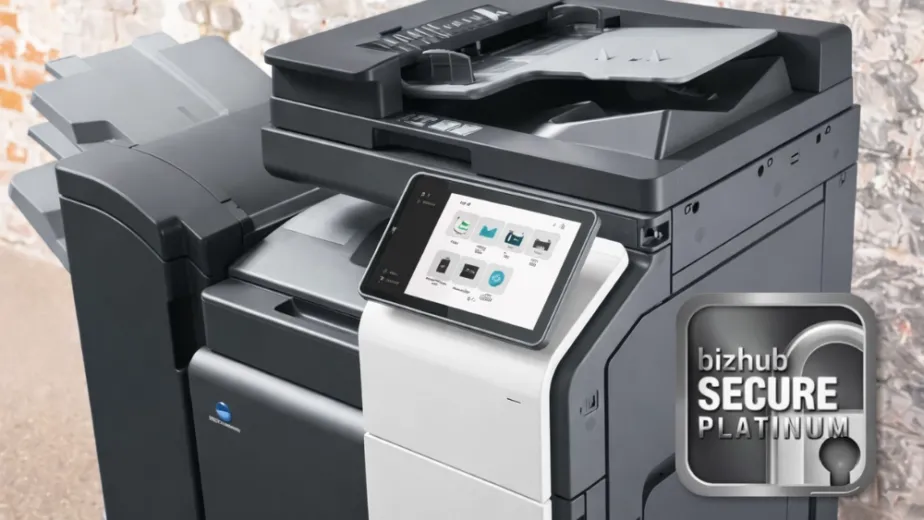
For example, available Konica Minolta bizhub devices supported by DRP range from compact A4 multifunction systems to larger, high-volume models. Features across the product range can include high-speed scanning, mobile printing, secure document functions, user authentication and a variety of scan destinations.
That variety is important because equipment should fit the business, not force the business to change around the equipment.
Managed Print Services for Long Island Small Businesses
Managing printers should not become another full-time responsibility for your employees. A structured managed print strategy can help reduce troubleshooting, organize service and supplies, and ensure the equipment is appropriate for the way your business operates.
DRP Solutions helps Long Island businesses evaluate their current print environments and determine whether existing equipment should be maintained, consolidated, or replaced.
The right copier or multifunction device can support everyday printing while also improving document workflows and giving your business access to technology designed around how your employees actually work.
Whether your organization needs to replace aging equipment, consolidate multiple devices, or develop a more structured print strategy, DRP can help you evaluate the options.
Contact DRP Solutions today for a free print assessment. The result can be fewer surprises, better visibility into costs, and less time spent dealing with office equipment problems. Most importantly, it allows your team to focus on the work that actually moves your business forward.
FAQs
It can be, even if the business only has a few printers or copiers.
Managed print is not limited to large organizations with hundreds of devices. A small business may benefit when employees are spending time ordering supplies, troubleshooting printers, arranging repairs or managing equipment from multiple vendors. The value depends more on how much time and complexity print environment creates than on the number of printers alone.
There is no minimum number.
A business with only a few heavily used devices may benefit just as much as a company with a larger printer fleet. Print volume, equipment age, service frequency, supply management, and employee involvement are often better indicators than device count. A print assessment can help determine whether managed services would provide enough value.
No. Existing equipment may be able to remain in place.
A managed print assessment should start by evaluating the printers and copiers the business already owns or leases. Some equipment may be appropriate, while order or inefficient devices may eventually need to be consolidated or replaced. The goal is to build the right environment rather than automatically replace every device.
Yes. Managed print programs can potentially include desktop printers, network printers, copiers and multifunction devices, depending on the provider and equipment. Reviewing the entire environment can also reveal whether separate devices are still needed or whether certain functions could be consolidated.
Ask about usage, service, supplies, equipment efficiency, security, and future needs.
A useful assessment should help you understand which devices employees use, monthly print volumes, recurring service problems, supply expenses, workflow requirements, and equipment age. It should also consider whether the current setup will support anticipated growth rather than focusing solely on today’s printing needs.