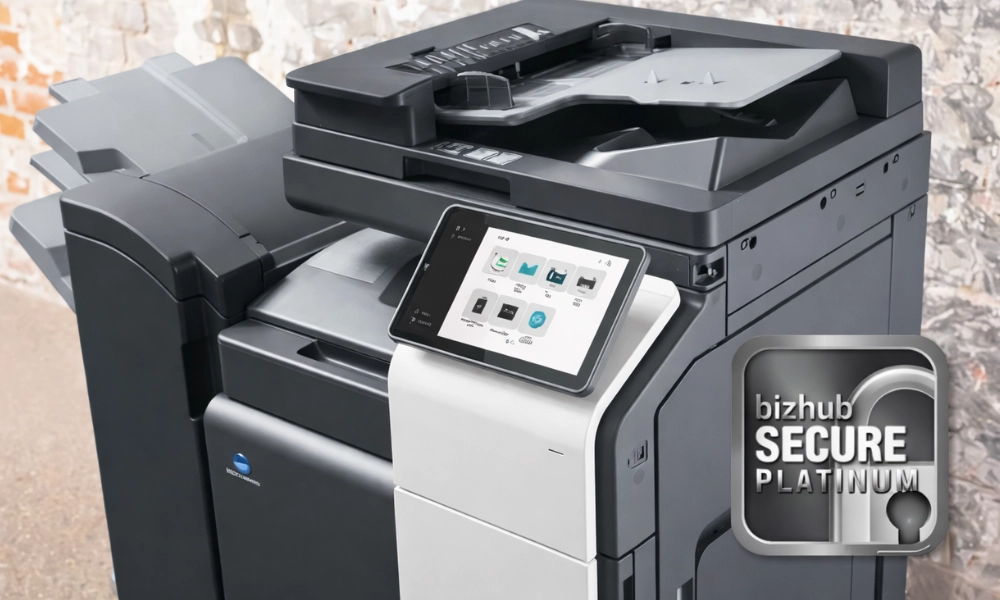
Walk into almost any office and you’ll find a copier quietly doing its job- printing, scanning, copying, and faxing without much thought from anyone around it. It’s familiar, reliable, and often overlooked.
But here’s the reality in 2026: Your office copier is one of the most vulnerable devices on your network.
And most businesses have no idea.
While organizations invest heavily in firewalls, antivirus software, and endpoint protection, they frequently ignore one critical fact: modern copiers are not just machines- they’re network-connected computers that store data, process sensitive information, and communicate across your entire infrastructure.
At DRP Solutions, where smarter offices begin, we see this gap every day. Businesses believe they’re secure, but their print environment tells a different story.
This article breaks down how secure your office copier really is, the risks you may not be seeing, and what it takes to protect your business in a world where every connected device matters.
Your Copier Is Not Just a Copier Anymore
If your perception of a copier is still “a machine that prints and copies,” it’s time to update that thinking.
Today’s multifunction printers (MFPs) are sophisticated devices that:
- Connect directly to your network
- Store documents on internal hard drives
- Send and receive data via email and cloud systems
- Integrate with document management platforms
- Require user authentication and permissions
In other words, your copier functions much like a computer- and it should be treated with the same level of security.
The problem is, most businesses don’t.
Copiers are often installed, connected, and forgotten. Security settings are left at default. Firmware goes unpatched. Access is wide open.
And that creates risk.
The Hidden Security Risks in Your Print Environment
Unlike more obvious cybersecurity threats, copier-related risks tend to fly under the radar. They’re not as visible as phishing attacks or ransomware headlines- but they can be just as damaging.
Data Stored on Hard Drives
Most modern copiers store copies of documents on internal hard drives. Every print job, scan, or copy may leave a digital footprint behind.
Without proper management, that data can remain accessible long after it’s needed.
This becomes especially concerning when devices are:
- Returned at the end of a lease
- Replaced or upgraded
- Services by third parties
If data isn’t properly wiped or encrypted, sensitive information can be exposed.
Unsecured Print Jobs
How often do documents sit unattended in your output tray?
It happens all the time- and it’s major security risk. Unclaimed print jobs can include:
- Financial documents
- HR records
- Contracts
- Customer information
All it takes is the wrong person walking by at the wrong time. In industries with compliance requirements, like medical or law, this isn’t just a risk- it can become a liability.
Network Entry Points
Because copiers are connected to your network, they can serve as entry points for cyberattacks. If a device is not properly secured, attackers may exploit vulnerabilities such as:
- Open ports
- Weak or default passwords
- Outdated firmware
Once inside, they can potentially move laterally across your network- accessing other systems and data. This is one of the most overlooked threats in office environments.
Outdated Firmware and Software
Just like any other connected device, copiers require regular updates. Without them, they may contain known vulnerabilities that hackers can exploit.
The problem? Most businesses don’t have a process in place to manage copier updates.
As a result, devices remain exposed long after patches are released.
Lack of Access Control
In many offices, anyone can walk up to a copier and use it- no login required.
This lack of access control creates several risks:
- Unauthorized document access
- Misuse of printing capabilities
- No accountability for usage
Without visibility into who is printing what, businesses lose control over both security and costs.
Why Copier Security Is Often Overlooked
If these risks are so significant, why do they go unnoticed?
The answer is simple: Copiers don’t feel like IT assets.
But in reality, they sit at the intersection of multiple critical systems: your network, your data, your workflows, and your users.
Responsibilities for managing them is often unclear. IT assumes someone else is handling it. Office managers assume IT is handling it. And in that gap, vulnerabilities grow. At DRP Solutions, we often find that businesses have strong security policies in place- they just forget to consider their print environment within them.
The Real Cost of an Unsecure Copier
Security risks are often framed in technical terms, but the real impact is business-related.
An unsecure copier can lead to:
- Data breaches
- Compliance violations
- Financial loss
- Reputational damage
In some cases, the cost of a single incident can far exceed the cost of securing your entire print environment. And yet, many organizations continue to operate without addressing this risk.
What a Secure Print Environment Looks Like
A secure office isn’t built by chance- it’s designed.
When copier security is handled correctly, it becomes a part of a broader strategy that protects you entire organization.
User Authentication
Instead of open access, users are required to verify their identity before printing or retrieving documents. This can include PIN codes, ID badges, or secure login credentials. This ensures that only authorized individuals can access sensitive information.
Secure Print Release
With secure print release, documents are only printed when the user is physically present at the device. This eliminates the risk of unattended documents sitting in output trays. It’s a simple change- but one that significantly improves security.
Data Encryption and Hard Drive Protection
A secure copier encrypts data both in transit and at rest. This means that documents are protected while being sent across the network and stored data is unreadable without proper authorization. Additionally, hard drive overwrite features ensure that data is automatically erased after use.
Regular Firmware Updates
Keeping devices up to date is critical. When you have a managed environment, it ensures that firmware updates are applied regularly, known vulnerabilities are addressed quickly, and devices remain compliant with security standards.
Network Security Integration
Copiers should not exist outside of your IT strategy. They should be integrated into your overall security framework, including firewall protection, network segmentation, monitoring, and alerts. This ensures they are treated like any other endpoint.
Activity Monitoring and Reporting
Visibility is key to security. Secure print environments provide insights into who is printing, what is being printed, and when or where activity occurs. Not only does this improve device and network security, but it helps identify inefficiencies, reduce waste, and reduce overall cost per page.
How Managed Print Services Strengthen Security
One of the most effective ways to secure your copiers is through Managed Print Services (MPS).
Instead of leaving security to chance, MPS introduces structure, oversight, and expertise. At DRP Solutions, managed print goes beyond cost savings- it’s about creating a secure, optimized environment that aligns with your broader IT strategy.
With MPS, businesses benefit from:
- Proactive monitoring of all devices
- Automated updates and maintenance
- Secure configurations from day one
- Ongoing optimization and support
Rather than reacting to problems, your print environment becomes proactively managed and continuously protected.
Signs Your Copier May Be a Security Risk
Not sure where your office stands?
Here are a few indicators that your copier security may need attention:
- Devices are accessible without login credentials
- You’ve never updated firmware
- Print jobs are frequently left unattended
- You don’t know what data is stored on your device
- Your IT team doesn’t actively manage print security
If any of these apply, your print environment is likely to have vulnerabilities.
Building a Smarter, More Secure Office
Security isn’t about stacking more tools onto your environment- it’s about creating a smarter, more connected workplace where everything works together seamlessly.
At DRP Solutions, we believe that a truly secure office is a managed office- one where systems are fully integrated, devices are continuously monitored, and potential risks are identified and addressed before they become real problems. Instead of operating in silos, your technology should function as a unified ecosystem, supporting efficiency and protection.
Copier security is just one piece of larger strategy, but it plays a critical role in ensuring your office is not only productive, but fully secure from every angle.
Why Businesses Trust DRP Solutions
Businesses partner with DRP Solutions because they want more than just equipment- they want a strategy.
Our approach combines:
- Managed Print Services
- Managed IT Services
- Document workflow solutions
- Ongoing support and optimization
We don’t just install devices- we ensure they are secure, efficient, and aligned with your business.
Because smarter offices don’t just function- they are designed to perform.
Final Thoughts: The Risk You Can’t Afford to Ignore
Your copier may not look like a cybersecurity threat- but it is. In 2026, ignoring that really isn’t an option.
Every connected device in your office plays a role in your overall security posture. When even one is left unmanaged, it creates an opportunity for risk. The good news? This is a problem that can be solved with the right strategy, the right tools, and the right partner.
Ready to Secure Your Print Environment?
If you’re unsure how secure your office copiers really are, now is the time to find out.
A professional print assessment can uncover vulnerabilities, identify opportunities for improvement, and help you build a more secure, efficient workplace.
DRP Solutions is here to help you take that next step. Because at the end of the day…
A smarter office isn’t just more efficient- it’s more secure.